








Inspektor365 · Incident response software for Microsoft 365

Turn logs into insight.
Inspektor365 turns the Microsoft 365 audit log and Defender XDR alerts into one visual security investigation. Follow identities across workloads, see the sequence of events, find the persistent changes an attacker left behind and turn your findings into a cyber recovery plan.
See what changed in Microsoft 365, who did it, what Defender saw and how to put it right.
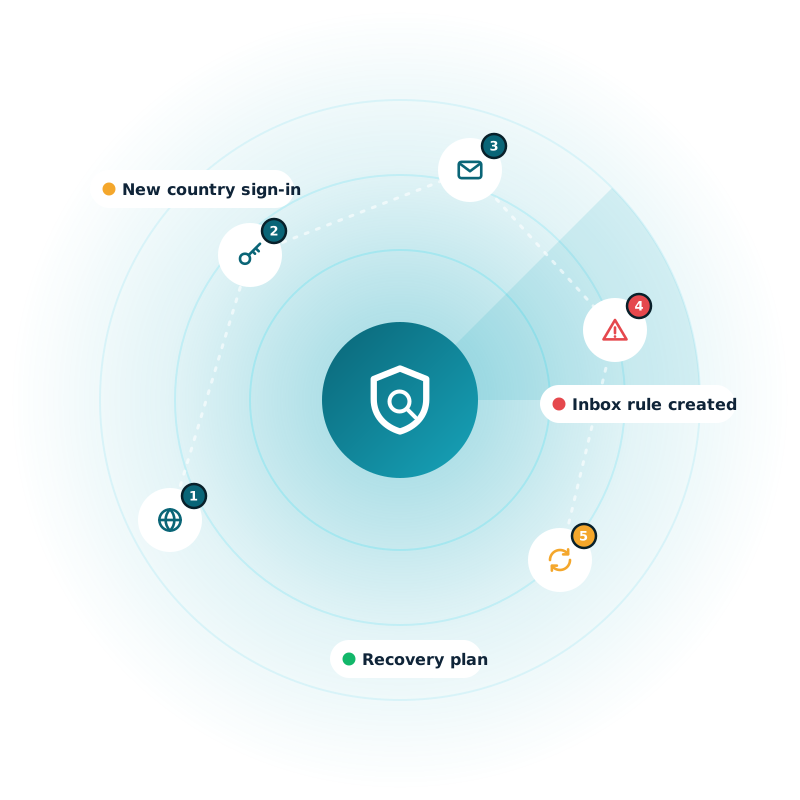
Every event on one timeline
Follow identities across workloads
Find what attackers left behind
A clear recovery plan
Sound familiar?
When something goes wrong, the evidence is everywhere
Investigating a Microsoft 365 incident often means moving between Entra ID, Exchange Online, SharePoint, OneDrive, Teams, Purview and Defender.
Inspektor365 brings that evidence together, so your team starts with a clear view of who acted, what changed, when it happened, what happened next and what needs to be put right.
Evidence in separate portals
Entra changes in one place, Exchange and SharePoint in the Purview audit search, and Defender alerts in another console.
Timelines rebuilt by hand
Investigators export CSVs and paste them into spreadsheets to work out what happened, and in what order.
One person, three names
The audit log records the same identity as an object ID, an email address and an app ID, so following it is slow.
Persistence gets missed
A forwarding rule, a rogue MFA method or an OAuth app with mail access lets the attacker back in after the password reset.
Microsoft 365 coverage
One Microsoft 365 security investigation, across every workload
Inspektor365 reads the Microsoft 365 audit log and Defender XDR, and puts every workload on the same timeline.
Microsoft Entra ID
Roles, apps, consents, credentials, Conditional Access and MFA methods.
Exchange Online
Inbox rules, forwarding, mailbox delegation and mailbox access.
SharePoint and OneDrive
Downloads, anonymous and external sharing, and deletions.
Microsoft Teams
Chats, links shared from other organisations, guests and apps.
Microsoft Purview audit data
eDiscovery searches and exports, alongside the unified audit log.
Microsoft Defender XDR
Alerts and incidents, overlaid on the activity they relate to.
Visual investigation
See the sequence, not just the events
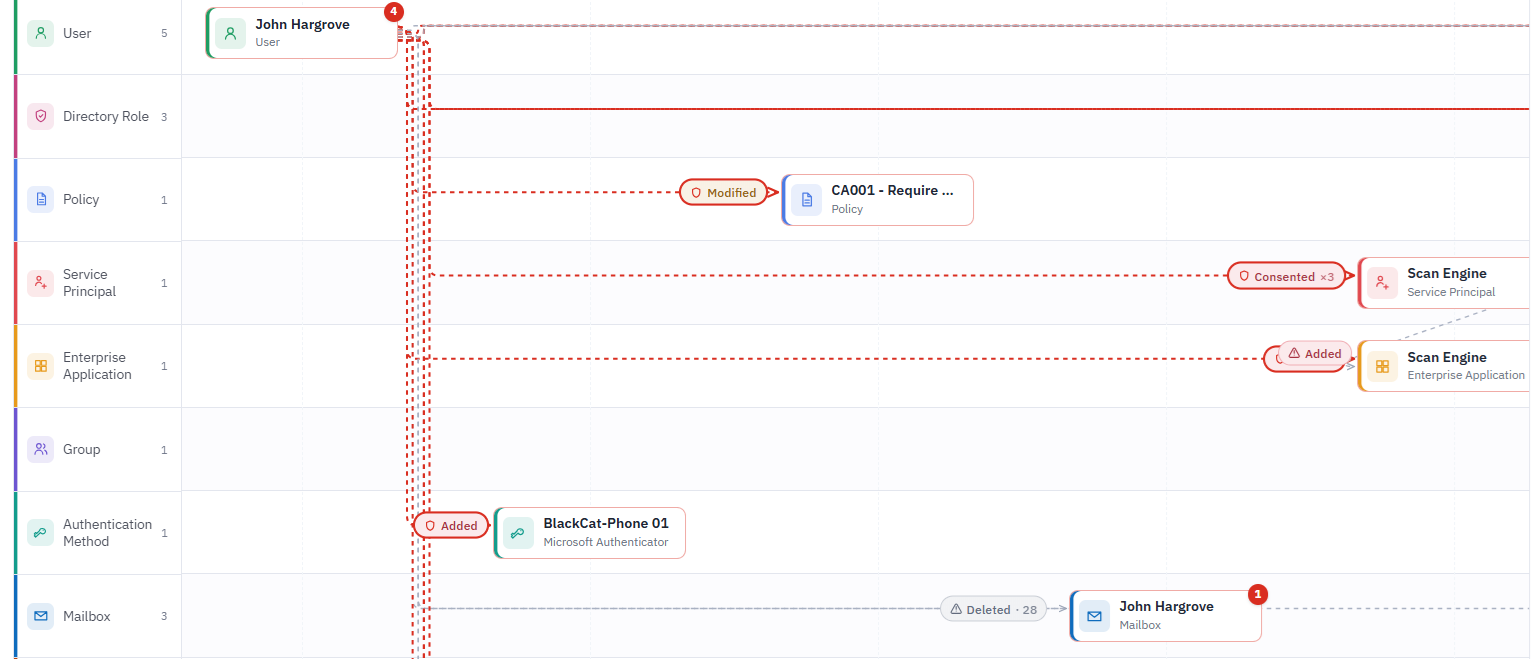
Inspektor365 turns individual Microsoft 365 audit log records into an interactive timeline and activity graph. Follow the links between identities, sessions, resources and changes without rebuilding the incident in a spreadsheet.
- Pivot by identity, IP address, resource or activity
- Filter by workload and time, from 30 minutes to 30 days
- Trace events across Microsoft 365, read left to right in the order they happened
- See related activity before and after a suspicious action
- Routine noise, such as read receipts and Microsoft background services, hidden with one switch
Context for every event
Identity correlation, Defender XDR and MITRE ATT&CK in one view
Identity correlation
Follow the same identity across workloads
Inspektor365 resolves user and app identifiers to one display name, so you can follow activity through sign-ins, mailboxes, files, sites, apps and Teams. Include what the accounts and apps they created went on to do.
Defender XDR context
Connect detections to the activity around them
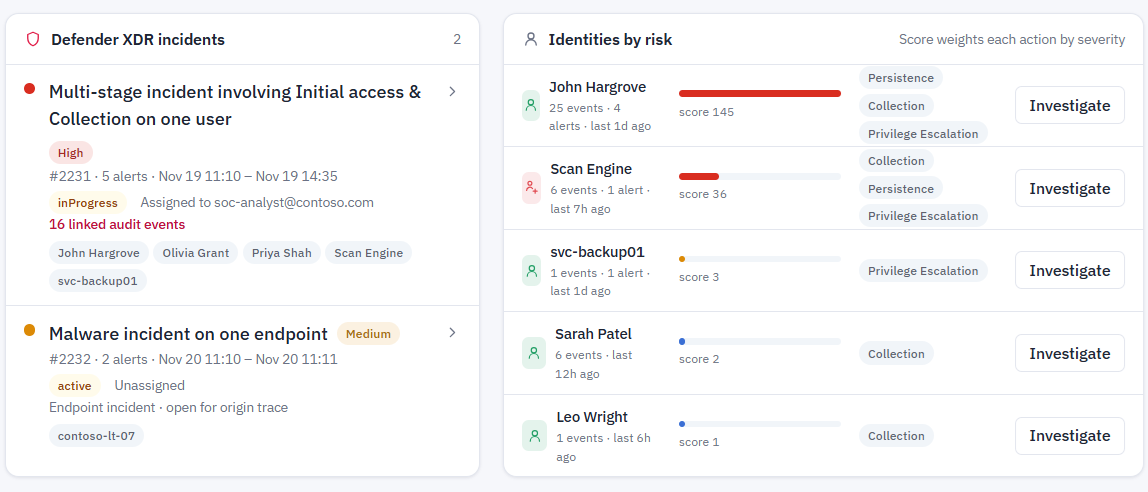
Defender XDR alerts and incidents appear on the timeline, linked to the audit events in their evidence: the IP address, mailbox, app, file or identity. Click an alert to light up the trail behind it.
MITRE ATT&CK mapping
Explain the tactics and techniques you see
Every action is mapped to a MITRE ATT&CK tactic and technique, such as persistence, privilege escalation and credential access. Click a tactic to filter to it.
Persistent changes
Find what an attacker may have left behind
A password reset does not remove every route back into your environment. Inspektor365 helps you review the changes that let an attacker return after a business email compromise or account takeover.
Inbox rules and mail forwarding
Mailbox delegation
OAuth app consent and new app credentials
New MFA methods
Role assignments
Conditional Access changes
External and anonymous sharing
New or backdoor accounts
Cyber Recovery
Know what to put right with a cyber recovery plan
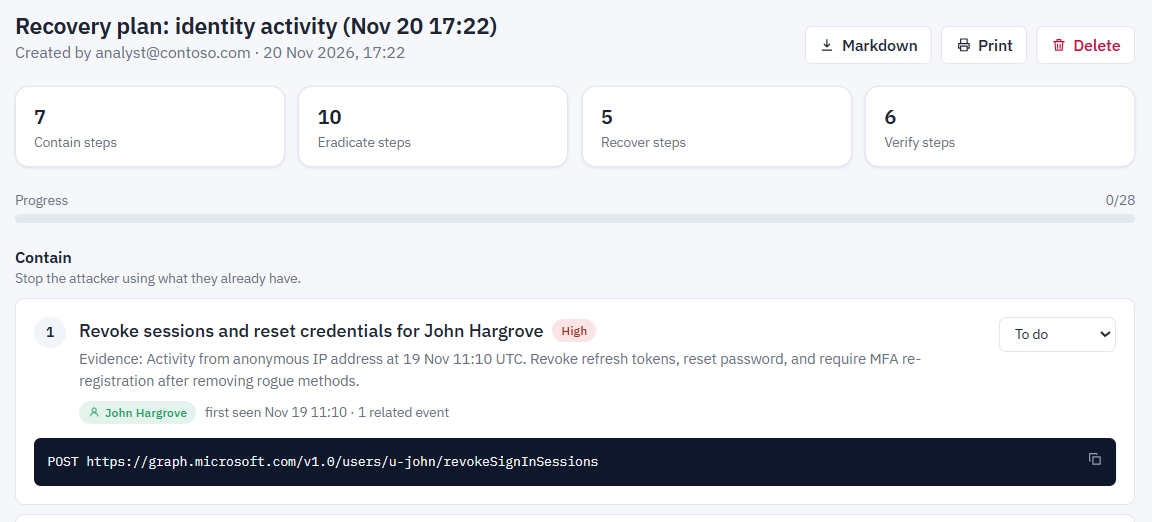
One click turns the activity in view into recovery guidance based on the changes and resources you actually found, not a generic checklist. Each step includes the Microsoft Graph call or PowerShell to run, with previous values where a change can be reversed.
- Contain: revoke sessions, disable rogue accounts and apps, revoke consents, remove sharing links
- Eradicate: remove inbox rules, forwarding, mailbox access, MFA methods, credentials and role assignments
- Recover: revert Conditional Access policies, restore deleted users and files
- Verify: assess mailbox and data exposure, and re-check coverage
Save the plan, track each step from to-do to done, and export it to Markdown or print it for your incident record.
Security and trust
Visibility without control
Inspektor365 is designed for read-only investigation. It collects the evidence your analysts need, but never changes your Microsoft 365 tenant. Recovery steps are guidance for your administrators to run.
Microsoft Entra ID sign-in
Your MFA, Conditional Access and leaver processes apply. No new passwords.
Least-privilege permissions
Four read-only application permissions, each tested and shown in Settings.
Tenant-isolated data
Each organisation only ever sees its own activity.
Defined retention
Activity is kept for 90 days by default, then deleted automatically. Disconnect and remove stored data when you need to.
Why Inspektor365?
From Microsoft 365 incident to confident recovery
Move from fragmented evidence to an incident story your team and your leadership can follow, without writing a single query.
Visual timeline and activity graph
One investigation across Microsoft 365
Identity correlation across workloads
Defender XDR and MITRE ATT&CK context
Persistent-change identification
Recovery guidance based on investigation findings
Read-only operating model
FREQUENTLY ASKED QUESTIONS
Inspektor365 FAQs
Common questions about the product
Inspektor365 is incident response software for Microsoft 365. It turns the Microsoft 365 audit log and Defender XDR alerts into one visual security investigation, maps activity to MITRE ATT&CK and builds a cyber recovery plan from what it finds.
No. Inspektor365 is read-only. It never changes users, apps, mailboxes or policies. Recovery steps are guidance for your administrators to run.
Microsoft Entra ID, Exchange Online, SharePoint, OneDrive, Microsoft Teams, Microsoft Purview audit data and Microsoft Defender XDR alerts and incidents. It works with tenants many people still call Office 365.
Yes. Business email compromise often leaves inbox rules, forwarding, mailbox delegation or OAuth app consents behind. Inspektor365 finds those persistent changes, shows who made them and adds the steps to remove them to your recovery plan.
Four read-only application permissions: ActivityFeed.Read, Directory.Read.All, SecurityAlert.Read.All and SecurityIncident.Read.All. Settings tests each one against your tenant and shows what passes and what’s missing.
90 days by default, and you can change it. Older records are deleted automatically.
No. Inspektor365 shows the activity as a timeline and graph with no queries to write. It focuses on Microsoft 365 investigation and can sit alongside a SIEM if you already have one.
Yes. A demo tenant lets you explore a realistic compromise scenario with no Azure setup, for demos, training and evaluation.
Turn logs into insight
See what happened. Know what to do next.
Move from fragmented Microsoft 365 evidence to a clear incident story and a practical recovery plan. We'll walk you through a realistic compromise in the Inspektor365 demo tenant.