





Reflekt · Governance

Remain compliant and in control of your Microsoft 365 platform
The complete governance, lifecycle management and automation tool for your Microsoft 365. Reflekt guides users to the right Teams, sites and groups, checks for duplicates and manages each one through its lifecycle.
Better decisions
Reduce duplication
Flexible and configurable
Simplify Microsoft 365
Why Reflekt
Make it easier for users to choose the right Microsoft 365 workspace
Microsoft 365's growing range of products can be incredibly confusing for your workforce, and that confusion can reduce productivity.
Reflekt helps users pick the right tool, guides them through creation and suggests existing Teams, sites and groups to reduce duplication.
Consistent, standardised information
Keep information across your tenant in the right place, for the right length of time.
A faster start
Give users a head start with reusable templates.
Trace every action
Help users find and reuse the Teams, sites and groups that already exist.
Be ready for inspection
Link sensitivity and retention labels and policies to each template.
what we provide
Govern, automate and manage Microsoft 365
Reflekt has three core capabilities. Assisted Intelligence guides users to the right place, Governance & Automation manages the lifecycle, and Templating keeps every workspace consistent.
Guided questionnaire
Guide users towards the right solution. Configure the questions, answers and weightings to match your organisation, and recommend a Teams channel, SharePoint site or Microsoft 365 Group. Extend it to third-party applications and services.
Discovery and duplication checks
Help users discover what already exists. Reflekt suggests relevant Teams, sites and groups before new ones are created and warns users of clashes, which encourages reuse across your organisation.
Self-service creation
Let staff create Teams, SharePoint sites and Microsoft 365 Groups on their own, within your organisation's policies. An intuitive wizard applies your naming conventions, field limits and the policies attached to each template.
Lifecycle management
Manage the full lifecycle of Teams, SharePoint sites and Microsoft 365 Groups. Get granular control over approvals, archiving and disposition, delegate approvals across your organisation and set policies per template.
Microsoft 365 templates
Create consistent, compliant workspaces with reusable templates. Define your own for Teams, SharePoint and Microsoft 365 Groups, configure themes, navigation, content types, pages, web parts and add-ins, and link labels to each.
Taxonomy and tagging
Link your organisational taxonomy to templates and the workspaces created from them. Staff find what exists more easily, and you can query workspaces by tag and use sensitivity labels to identify tagged content.
Dashboard & reporting
See every Microsoft 365 Group and Team in your tenant
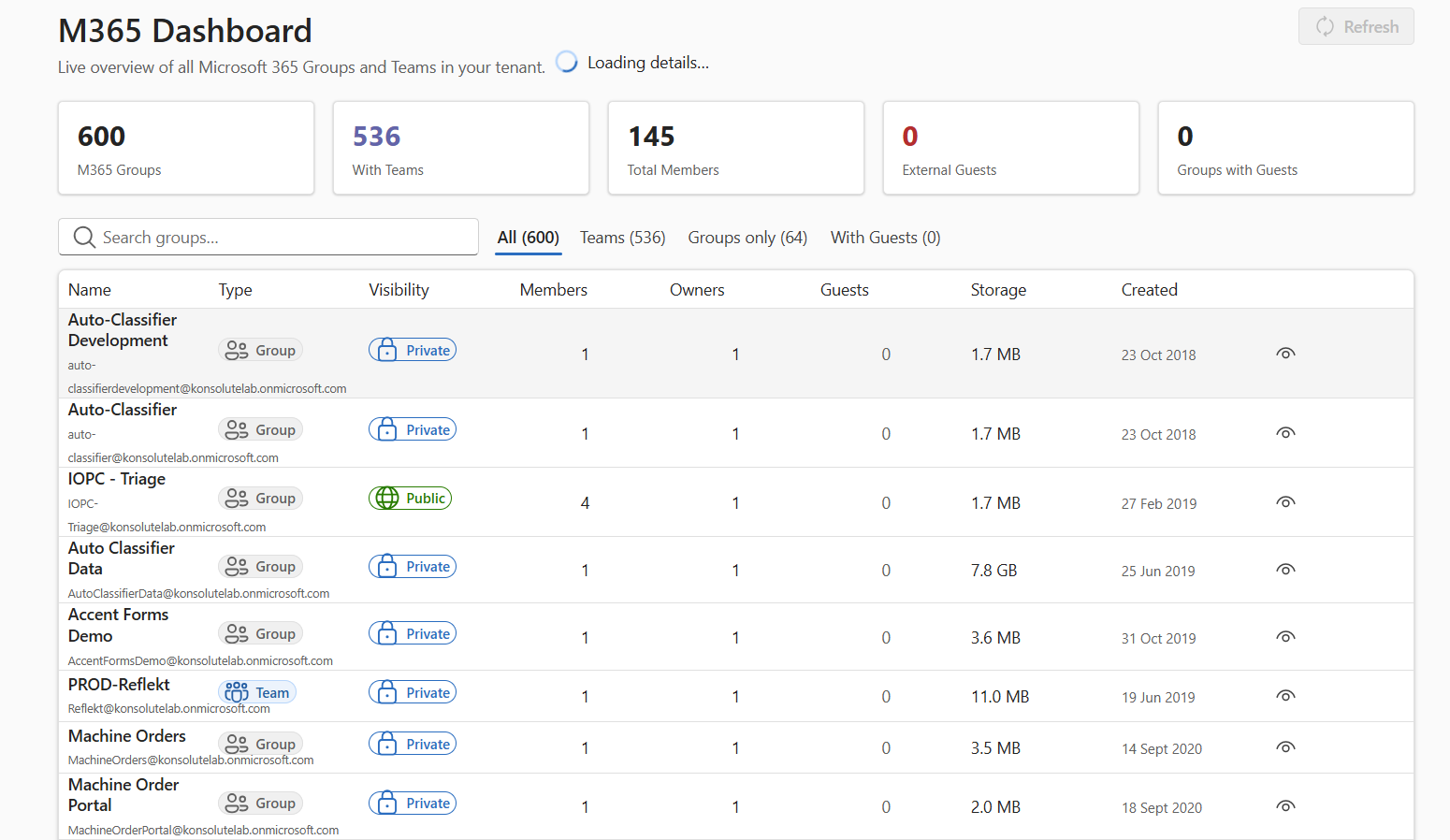
The M365 Dashboard gives a live overview of the Microsoft 365 Groups and Teams in your tenant, so you know what exists before anything new is created.
Totals at a glance
Groups, Teams, total members, external guests and groups with guests.
Filter and search
Switch between all, Teams, groups only and groups with guests, or search by name.
Details for each one
Type, visibility, members, owners, guests, storage and the date it was created.
How it works
Guide users to the right place in Microsoft 365
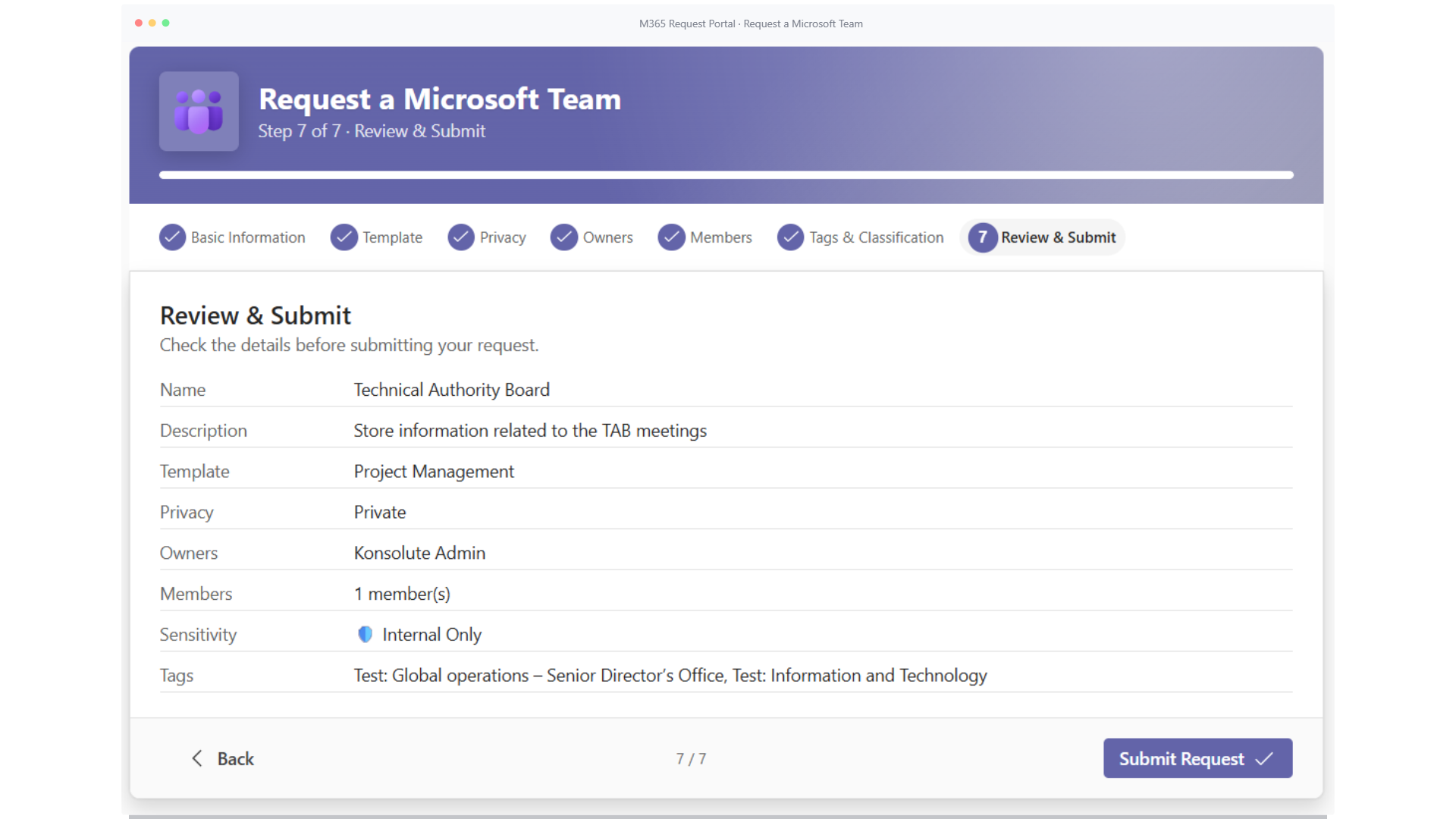
Users answer a few questions to find the right workspace, then follow a guided request. Requesters track their requests in My Requests, and approvers review theirs in Approvals.
1. Basic information
Name and describe the workspace.
2. Template
Choose from the templates your admins make available.
3. Privacy
Make it private or public, within your policy.
4. Owners
Add owners, within the limits you set.
5. Members
Add the people who need access.
6. Tags & Classification
Tag it from your term store and apply a sensitivity label.
7. Review & submit
Check the details, then submit for approval.
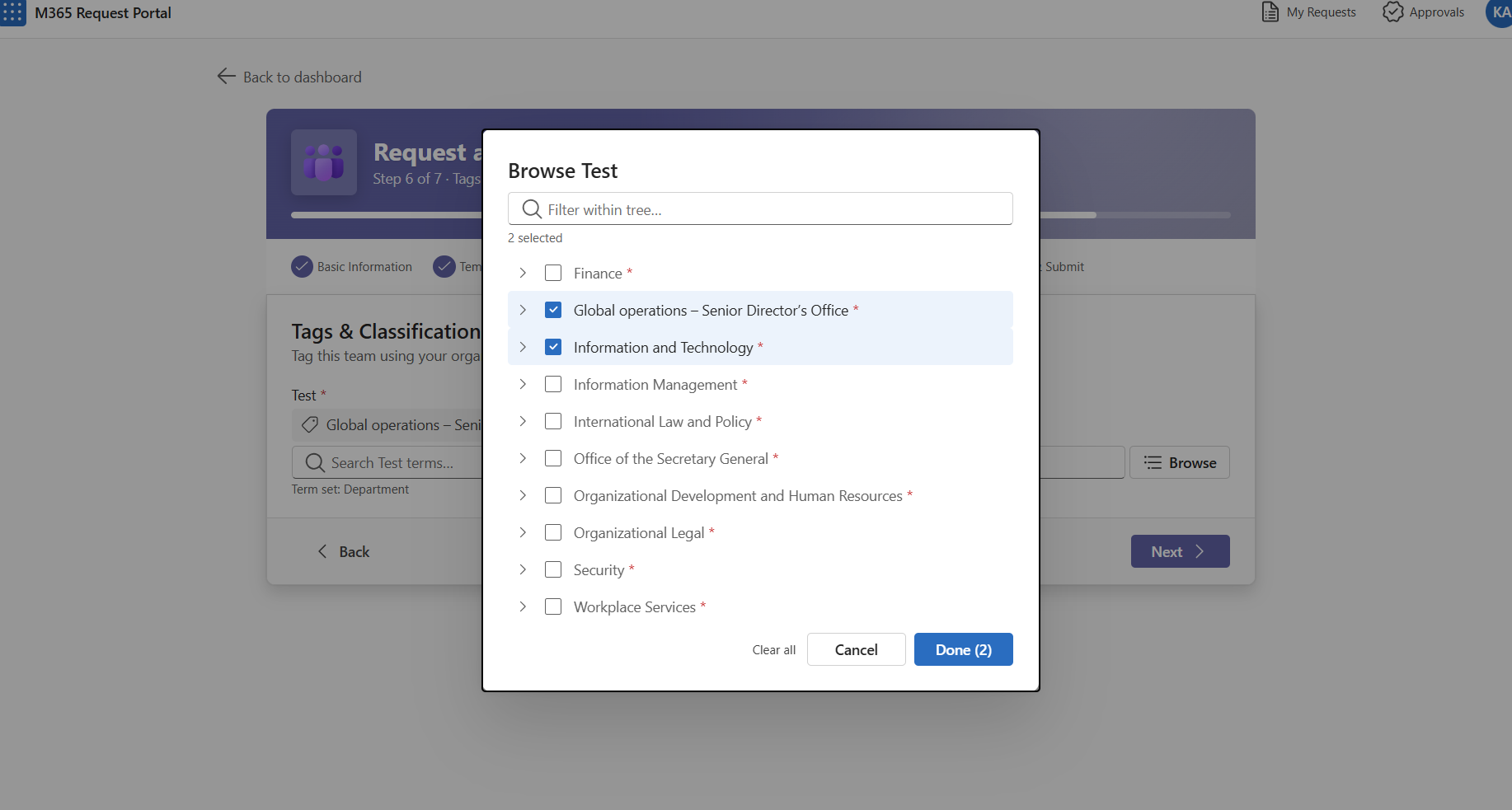
Step 6: users browse your organisation's term set to tag the request.
Portal settings
Set the rules once for each request type
Admins configure rules, naming conventions and taxonomy fields in Portal Settings. Each request type has its own page: Teams, SharePoint, Microsoft 365 Groups, Power BI, Viva Engage, private channels, Power Platform environments and Power Automate.
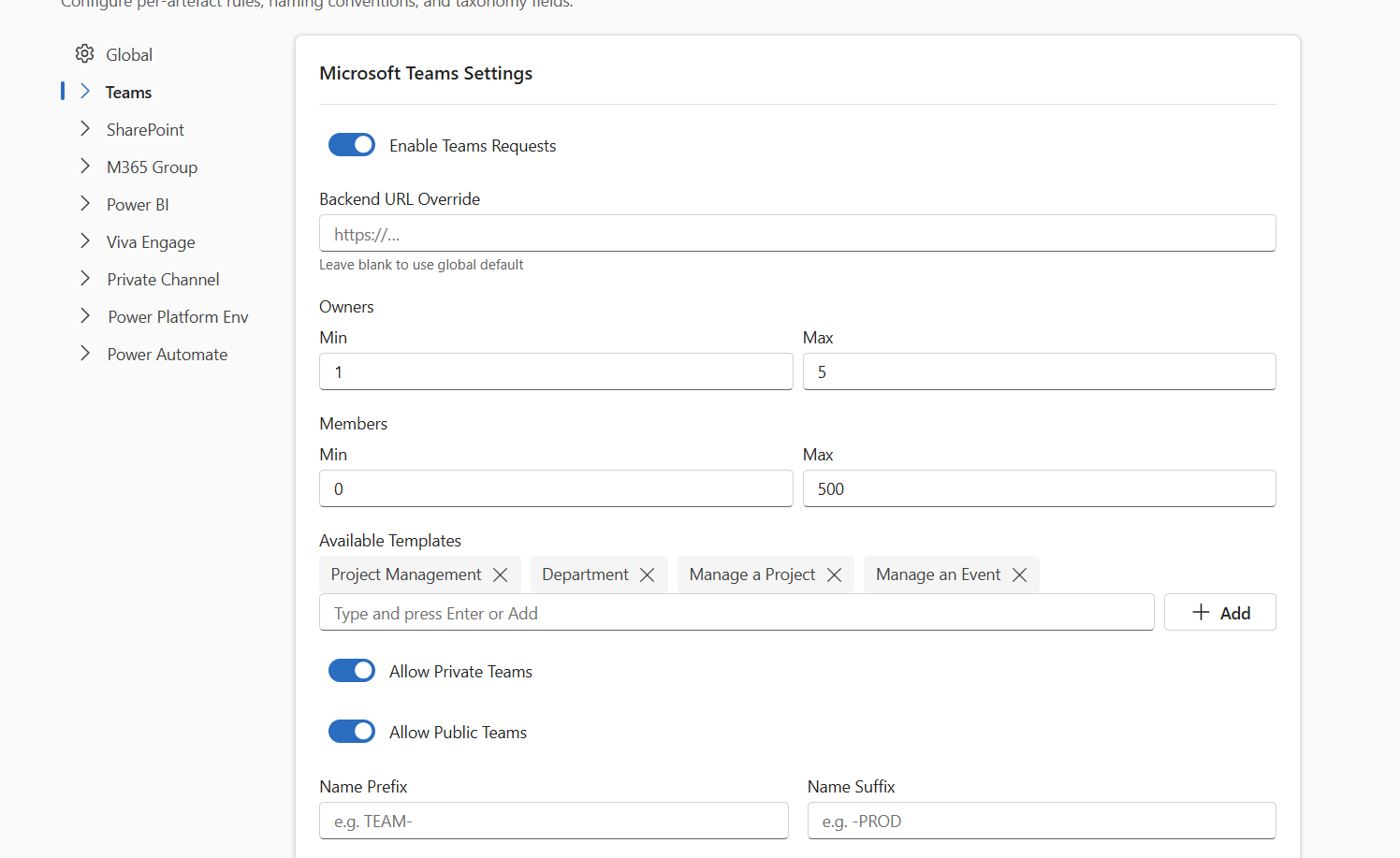
Teams settings: owner and member limits, templates, privacy and naming.
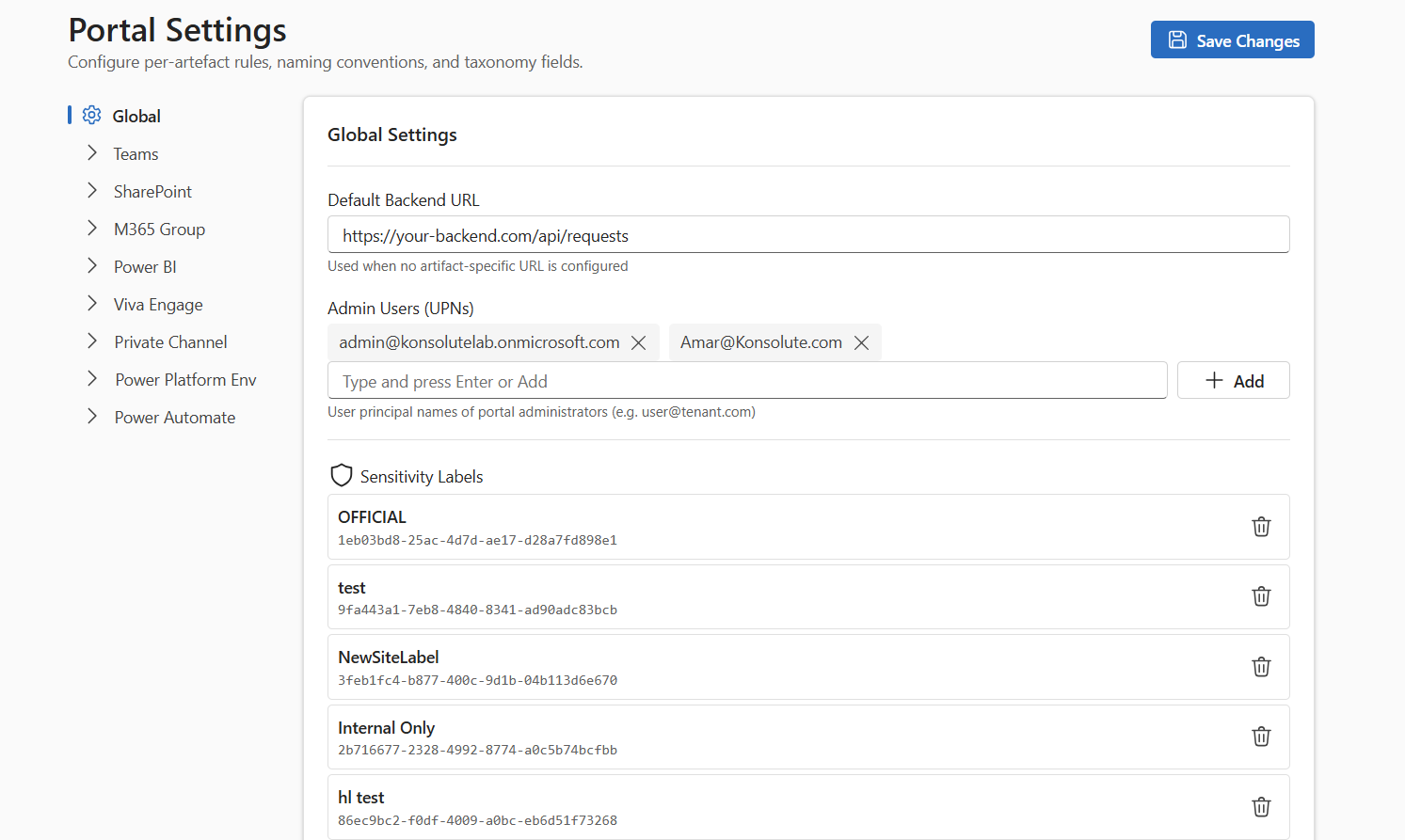
Global settings: portal administrators and sensitivity labels.
Request types on or off
Turn requests on or off for each type, such as Teams.
Naming conventions
Add a name prefix and suffix for each request type.
Owner and member limits
Set the minimum and maximum number of owners and members.
Available templates
Choose the templates users can pick, such as Project Management or Department.
Privacy options
Allow private teams, public teams or both.
Sensitivity labels
Choose the sensitivity labels users can apply to a request.
FREQUENTLY ASKED QUESTIONS
Reflekt FAQs
Common questions about the product
Reflekt is the complete governance, lifecycle management and automation tool for your Microsoft 365. It covers Microsoft Teams, SharePoint and Microsoft 365 Groups.
Yes. Staff create Teams, SharePoint sites and Microsoft 365 Groups themselves, within the policies your admins attach to each template.
Before anything is created, Reflekt suggests existing Teams, sites and groups and warns users of clashes.
Yes. Define your own templates for Teams, SharePoint and Microsoft 365 Groups, including themes, navigation, content types, pages, web parts and add-ins.
Approval processes are set per template. You can delegate them to individuals or groups across your organisation and control who can approve what.
Yes. Link sensitivity and retention labels to templates, so they apply to the Teams, sites and groups created from them.
Yes. The M365 Dashboard gives a live overview of the Microsoft 365 Groups and Teams in your tenant, with members, owners, guests, storage and created date for each.
Install Reflekt in Microsoft Teams or get it from Microsoft AppSource. You can also start a trial or request a demo.
Ready to take control?
Remain firmly in the driving seat of your Microsoft 365 environment
Discover how Reflekt can help your organisation govern, automate and manage Microsoft 365 with confidence.